
Does LinkedIn Show Who Viewed Your Profile?

By Sam Cassman · Last verified
Does LinkedIn show who viewed your profile? Partly. A free account shows how many people looked at you in the past 90 days, groups them by where they work, and names at most three of them. You only get those three if your own profile viewing setting shows your name, and Premium extends the list to 365 days. We checked this first hand on a free account in October 2026.
Are you trying to find out whether LinkedIn shows who viewed your profile? It is one of the most confusing corners of the whole site, because the answer is neither yes nor no. You get a number, you get some tantalising hints about who those people are, and then you hit a wall that nobody explains. Half the guides out there quote figures that LinkedIn changed years ago, so we went and looked at the real thing.
Most people think the viewers list is a Premium feature, and that a free account sees nothing at all. It is not, and it does. A free account sees the count, the groups and up to three viewers by name. The reason most people see no names has nothing to do with paying: it is a privacy setting of their own that quietly switches the whole feature off.
In this article we'll cover exactly what a free account shows, why your own list might be empty, how to change the setting in two clicks, what people see when you look at them, and what Premium actually adds. Read on to find out more.
Does LinkedIn show who viewed your profile?
Yes, partly. LinkedIn shows every account how many people viewed it in the past 90 days, and shows those viewers grouped by where they work and what they do. What it holds back is the list of names: a free account sees at most three, and only under one condition we'll come to.
To find yours, click Me in the top bar, choose View profile, then open Analytics and
click profile views. The direct address is linkedin.com/me/profile-views/, which redirects to
the analytics page.
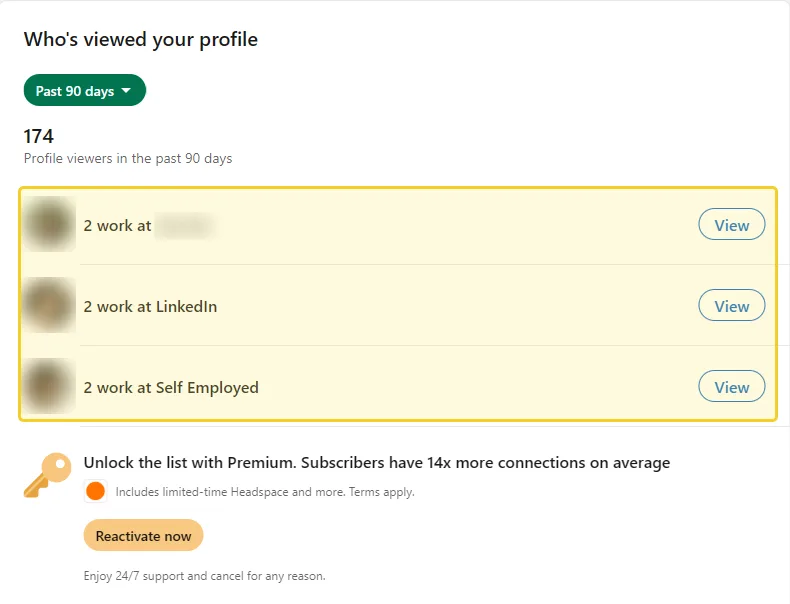
That is a real free account with no Premium subscription. The count is there, the groups are there, and clicking View on any group opens an advert for Premium rather than the people in it.
What can you see on a free LinkedIn account?
Three things, and they are more useful than most people realise. You get a 90-day total, you get your viewers sorted into groups, and you get a list of anonymised entries describing each one. Only the names are held back.
- The 90-day count. The headline number at the top, covering the past 90 days.
- Viewers grouped by company and role. Lines such as "2 work at LinkedIn" or "3 are senior leaders who share your job function". This is the part worth reading: it tells you what kind of person your profile is attracting, even with no names attached.
- Viewer details. A list of entries such as "Someone at" a company, or a job title and industry and a location. Each one is a real person, described rather than named.
- Up to three named viewers, if your own viewing setting allows it.
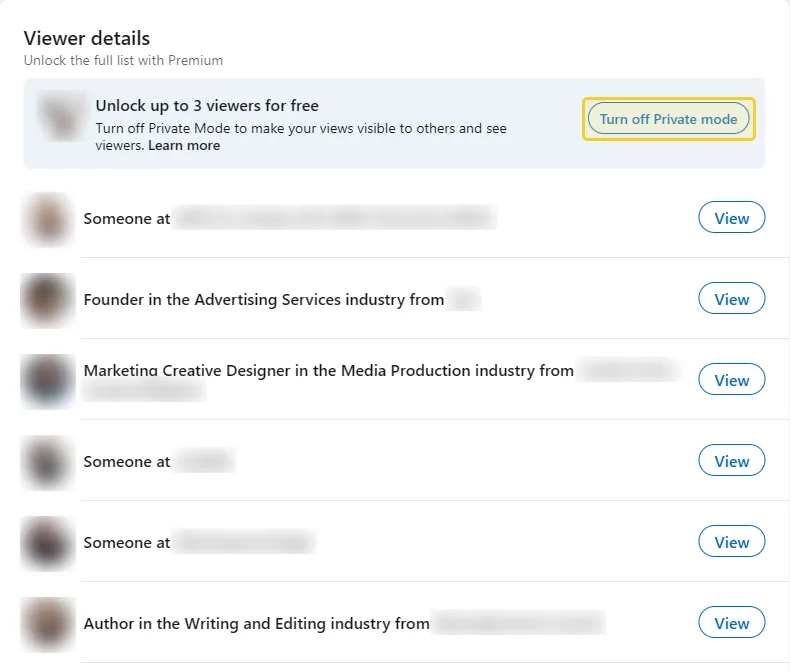
Note the figure in that banner: three. A lot of older guides still say a free account sees the last five viewers. LinkedIn's own help page says three, and the live page says "up to 3", so three is the number to trust. If a page you are reading says five, it has not been updated in a while, which is worth remembering for everything else on it.
So if the groups are showing but the names are not, the next section is almost certainly your answer.
Why can't I see who viewed my LinkedIn profile?
Because you are probably browsing privately yourself. LinkedIn runs this feature as a trade: it shows you the names of people who looked at you only while you let other people see your name when you look at them. Turn your own visibility off and the feature largely switches off with it.
The warning is on LinkedIn's own settings page: selecting Private profile characteristics or Private mode "may disable Who's Viewed Your Profile and erase your viewer history". That last part matters. It is not only that new viewers stop appearing, the history you had can go too.
The account in our screenshots is in private mode, which is exactly why its viewer list is anonymised while the count still works.
How do you turn your LinkedIn profile viewers back on?
- Click Me, then Settings & Privacy.
- Open Visibility in the left-hand menu.
- Find Visibility when viewing other profiles and click it.
- Choose Your name and headline.
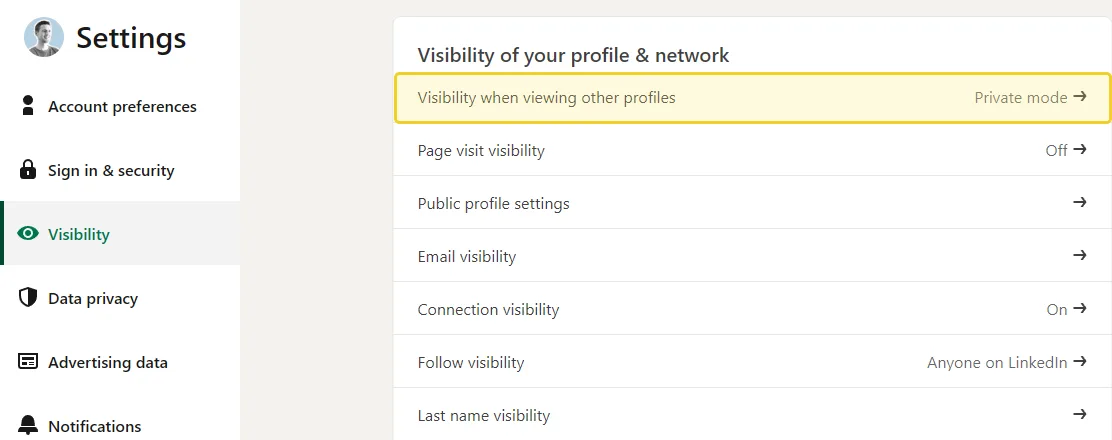
Your viewer history does not necessarily come back when you flip the setting. New viewers start appearing from then on, which is the practical fix.
Can people see if you view their LinkedIn profile?
That is the same setting, read from the other end. Whether someone can see that you visited them depends entirely on which of the three profile viewing options you have chosen, and it applies to every profile you open.
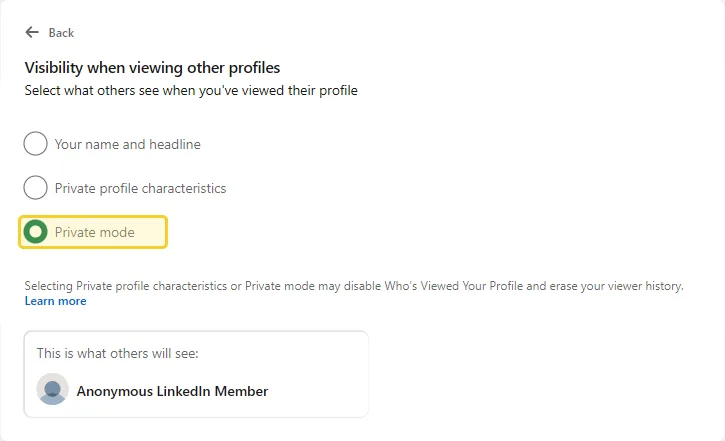
| Your setting | What the other person sees | What you get back |
|---|---|---|
| Your name and headline | Your name, headline and photo | Up to 3 named viewers, 90 days |
| Private profile characteristics | A job title and industry, no name | Viewers may be hidden |
| Private mode | "Anonymous LinkedIn Member" | Viewers hidden, history may be erased |
The middle option is the one people misread. It does not hide you completely: it describes you. If you are the only person in your city with your job title, a reasonably curious reader can work out who you are.
So pick deliberately. If you are job hunting and want to be noticed, use your name and headline. If you are researching a competitor, private mode is the honest choice, and the cost is your own viewers list.
What does LinkedIn Premium add to profile views?
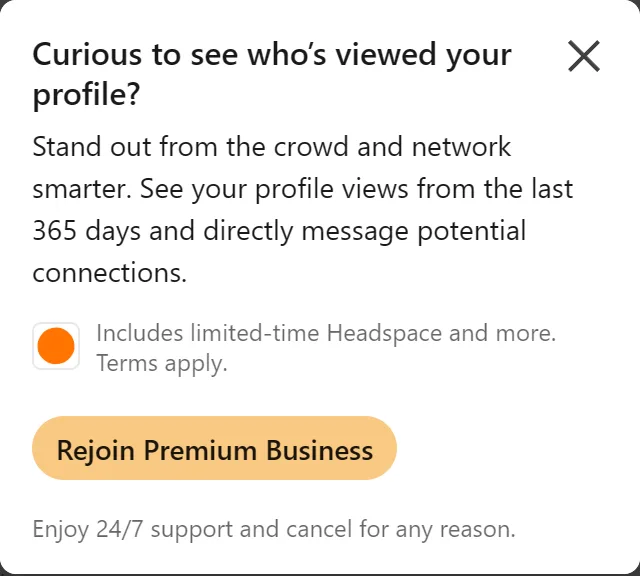
Premium extends the window from 90 days to 365 and unlocks the full list of viewers who chose to be visible, instead of the three you get for free. That is the real difference: time and completeness, not a special power to see through other people's privacy settings.
Two honest caveats, because this is where most pages overpromise:
- Premium cannot unmask someone in private mode. If a viewer chose to be anonymous, LinkedIn did not record a name for anyone to be shown. Premium shows you more of the people who were already visible, not the ones who were not.
- We could not photograph the Premium list. The account we tested on has lapsed Premium, so we are describing what LinkedIn's help page and its own upgrade pop-up promise, not a screen we saw. We would rather say that than draw you a layout we are guessing at.
Are LinkedIn profile views worth tracking?
Not on its own. It tells you that someone looked, which is a weak signal: a view costs the viewer nothing and means anything from genuine interest to a misclick. The people who react to or comment on your posts have spent something, and they are a far better list to study.
It is also mostly downstream of posting. Nobody visits a profile they have not been reminded exists, and what reliably reminds people is a post in the feed. In our study of 116,000+ posts from 2,400+ creators, attaching an image got about 35% more reactions than the same person's text-only posts, and it worked for about 7 in 10 of the 1,047 people we could compare that way. It is the most reliable single win in our study. If your posts usually get 30 reactions, an image would take that to about 40.
To be straight about the limit of that: our data covers posts, not profile visits. We can tell you what earns more reactions, and we cannot tell you how many of those readers went on to click your name. Nobody outside LinkedIn can.
If you want a yardstick for the engagement side, our benchmarks for a good LinkedIn engagement rate give the typical figures by audience size.
Which is the better signal, profile views or post engagement?
A profile view tells you someone looked. A reaction or a comment tells you who they are, because the name is attached. That is the list worth reading, and the question worth asking of it is whether those people are the ones you are trying to reach.
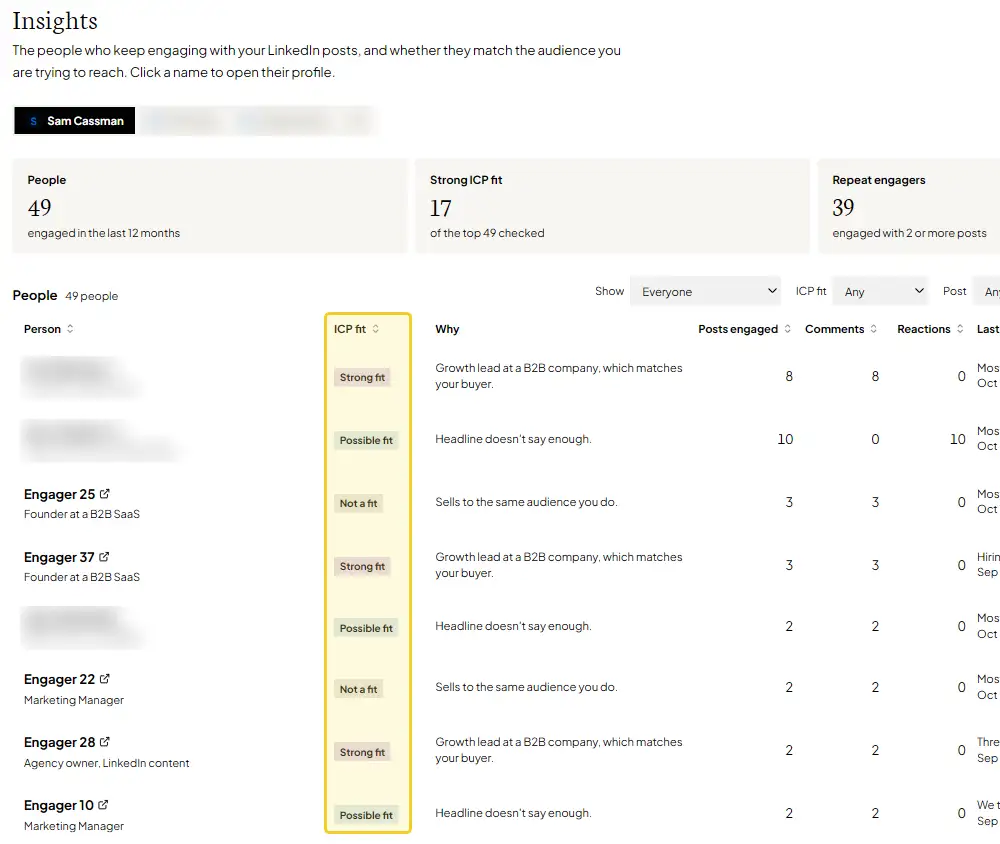
Flypost's Insights report (on our Pro and Agency plans) lists the people who reacted to or commented on your posts over the past year and marks each one against your ideal customer, with a one-line reason. It answers the question the viewers list only gestures at.
What should you do about your LinkedIn profile views?
- Check your viewing setting first. Me, then Settings & Privacy, then Visibility, then Visibility when viewing other profiles. If it is not "Your name and headline", that is why your list is empty.
- Read the groups, not the names. "Senior leaders who share your job function" tells you more about whether your profile is working than three names ever will.
- Switch to private mode deliberately, when you are researching someone and do not want them to know, and accept that your own list goes quiet while it is on.
- Ignore the five-viewer advice. It is three.
- Spend the effort on posts instead. Profile views follow from being seen in the feed, and an image on your next post is the most reliable thing our data found.
How we checked who can see your LinkedIn profile views
We looked at the real thing rather than summarising other guides. On 12 October 2026 we opened the Who's Viewed Your Profile page, the Viewer details list and the profile viewing settings on a desktop browser, signed in to a free LinkedIn account whose Premium subscription had lapsed, and captured each screen on this page. That account browses in private mode, which is why its viewer entries are anonymised: a real example of the trade this page describes.
We cross-checked the figures against LinkedIn's own help page, Who's viewed your profile: differences between basic and Premium accounts, which was last updated two months before we read it on 12 October 2026. Where that page and the older third-party guides disagree, as they do on the three-versus-five question, we have gone with LinkedIn.
Two things we did not verify first hand, and have therefore described loosely rather than shown: the Premium viewers list, because the test account's Premium has lapsed, and the previews for the "Your name and headline" and "Private profile characteristics" options, because selecting one saves it immediately and would have changed the live account's setting.
Every viewer photo, employer name and location in the screenshots is blurred, and the Flypost Insights screenshot uses test data rather than anyone's real engagers.
The engagement figures come from our LinkedIn algorithm study of 116,000+ posts, analysed from 2,400+ B2B creators between October 2025 and September 2026.
Frequently asked questions
- Does LinkedIn show who viewed your profile?
- Partly. Every account sees how many people viewed it in the past 90 days and sees those viewers grouped by where they work and what they do. A free account can see at most three viewers by name, and only if its own profile viewing setting is set to show your name and headline.
- Can people see if you view their LinkedIn profile?
- That depends on one setting of yours. If your profile viewing option is 'Your name and headline', they see exactly who you are. If it is 'Private profile characteristics' they see a job title and industry but no name. If it is 'Private mode' they see 'Anonymous LinkedIn Member'.
- Why can't I see who viewed my LinkedIn profile?
- Usually because you browse privately yourself. LinkedIn's settings page warns that choosing Private profile characteristics or Private mode may disable Who's Viewed Your Profile and erase your viewer history. Switch your viewing option back to your name and headline and the names start appearing again.
- How many profile viewers can you see for free on LinkedIn?
- Up to three by name. LinkedIn's help page and the banner on the live page both say three. Older guides that say five are out of date.
- Does LinkedIn Premium show everyone who viewed your profile?
- Premium extends the list from 90 days to 365 days and shows the viewers who chose to be visible. It cannot reveal someone who browsed in private mode, because LinkedIn never recorded their name for anyone to see.
Written by
Sam Cassman
Founder, Flypost · Chiang Mai, Thailand
I'm Sam. I built Flypost after watching too many good businesses sit on years of material (blog posts, call transcripts, case studies, half-finished decks) and post almost none of it.
I write everything here myself. When I claim something works on LinkedIn, it's because I tested it first-hand or ran the numbers across our own data. Where I'm working from a small sample, I'll say so. I'd rather be useful than certain.