
How do I come up with post ideas in Flypost?
Last updated 25 October 2026
Quick answer
Click Create post on the Posts page and choose Suggest some ideas. Pick what to brainstorm from (your whole Brain or one notebook), the kinds of post you want and how many ideas, then click Brainstorm Ideas. When they land, keep the ones you like and discard the rest.
Are you staring at a blank page wondering what to post next? Flypost can hand you a batch of ideas built from your own material, so they're about things you actually know, not generic LinkedIn tips. You can also bring your own ideas, or turn something you've already written into a post.
In this guide we'll cover the four ways to start, how to keep and discard ideas, where your ideas live, and how Inspiration shows you what's working for other people in your space. Read on to find out more.
How do I brainstorm post ideas?
- On the Posts page, click Create post.
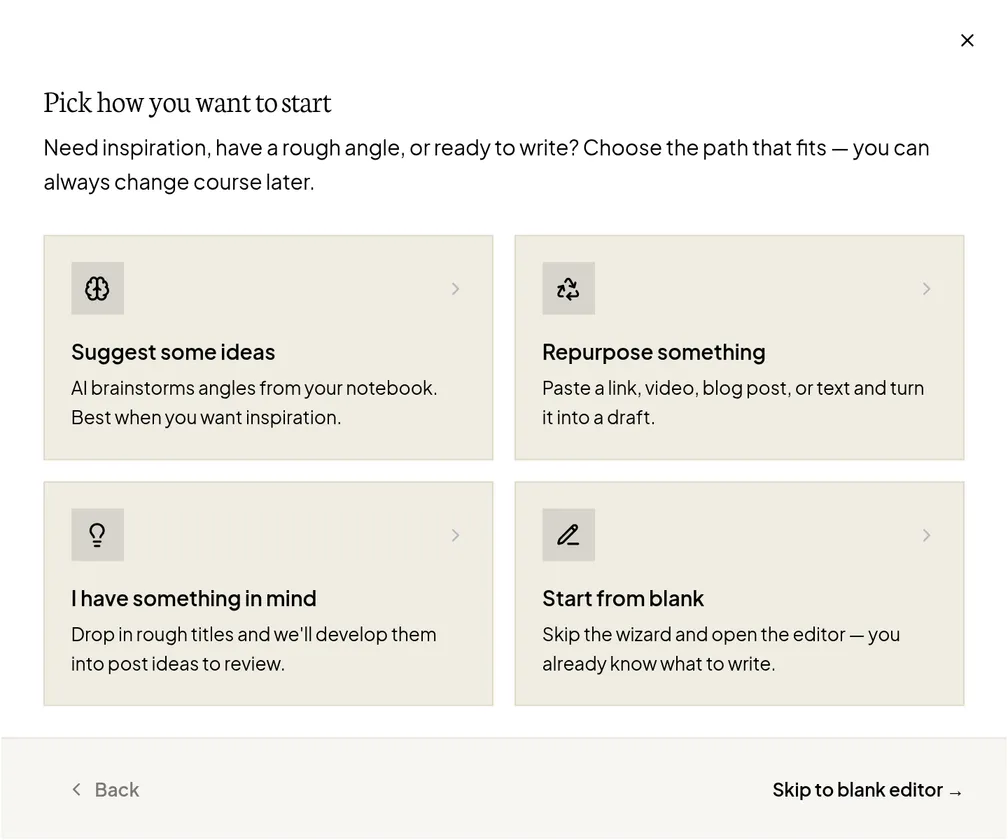
- Choose Suggest some ideas.
- Under What to riff on, pick Your whole Brain (everything), or one notebook or source if you want ideas on one subject. Click Next.
- Choose the kinds of post you want: Mix, Text posts, Carousels, Images, Infographics or Articles. For visual formats you can also pick a style. Click Next.
- Use the slider to choose how many ideas (anything from 1 to 20).
- Click Brainstorm Ideas.
Brainstorming happens in the background, so you can carry on working. Flypost lets you know when the ideas have landed.
What are the other ways to start a post?
The Create post window has three other options:
- Repurpose something: paste a link or some text (or pick something from your Brain), choose a format under Turn it into, and Flypost gives you a few different takes to choose from.
- I have something in mind: type your own title and, if you like, a line about the story you want to tell. Add up to 20 at once with Add another idea. Tick Use my title as written if you don't want Flypost to reword it.
- Start from blank: go straight to an empty editor and write it yourself.
How do I keep or discard ideas?
When a brainstorm finishes, a review window opens: "new ideas to review". For each idea, click Keep or Discard, or use Keep all and Discard all.
- Keep adds the idea to your Posts list and starts researching it straight away, so it's ready to write when you open it.
- Discard removes it. Flypost remembers what you discarded to learn what you like.
If you close the window before deciding, a banner on the Posts page reminds you how many ideas are waiting, with a Review now button.
Where do my ideas live?
On the Posts page. There's no separate ideas board: each idea is a card marked Idea, and it becomes Draft once you've started writing. Click Draft on an idea to start writing the post.
The filters at the top help you find things: by notebook, format, status or tag. Published posts are hidden unless you switch on Show published.
What is the Scratchpad?
The dark Scratchpad tab on the right edge of the screen (on a computer) is a place to jot down half-formed thoughts. When one is worth a post, click Promote to idea to turn it into an idea card.
How does Inspiration work?
Inspiration in the sidebar shows you what other LinkedIn creators in your space are posting, and which of their posts did well.
- Click New search, enter the topics you care about (press Enter after each one) and choose Instant or Deep (Deep needs at least 5 topics).
- To follow particular people, go to the Monitoring tab, click Add specific people and paste their LinkedIn profile addresses, one per line.
- Browse their posts on the Inspiration tab.
To use a post you like, select it and click Add to notebook. Then brainstorm from that notebook.
| Plan | People you can monitor | Automatic refresh |
|---|---|---|
| Creator | 3 | No (refresh by hand) |
| Pro and Agency | 25 | Daily, every 3 days, weekly or every 2 weeks |
Common questions
- Where is the Ideas page in Flypost?
- There isn't a separate one. Ideas live on the Posts page, as cards marked Idea. Once you start writing one, it's marked Draft.
- Where do discarded ideas go?
- They leave your list, and Flypost remembers them to learn what you like. They can't be brought back. Ideas you delete (rather than discard) go to the Bin for 30 days.
- How many ideas can I brainstorm at once?
- Between 1 and 20 per brainstorm.
- How many people can I monitor in Inspiration?
- 3 on the Creator plan and 25 on Pro and Agency. Automatic refreshing of the people you monitor needs Pro or Agency.