
How do I see how my LinkedIn posts are doing?
Last updated 25 October 2026
Quick answer
Click Analytics in the sidebar. It shows your LinkedIn posts from the last 12 months, including ones you posted directly on LinkedIn, with impressions, reactions, comments, engagement rate and who engaged. It updates every week, or click Refresh for the latest numbers. Analytics is on Pro and Agency.
Are you wondering which of your LinkedIn posts are actually working? Flypost's Analytics puts your last year of posts in one place, with LinkedIn's own impression numbers, and shows you not just how many people engaged but who they were.
In this guide we'll cover what Analytics shows, which posts it includes, how often it updates, and why a few numbers might be missing. Read on to find out more.
Where do I find my analytics?
Click Analytics in the sidebar. It's included on the Pro and Agency plans. On Creator, the page explains what's included and offers an upgrade. If you're on someone else's team, Analytics follows the plan of the project's owner.
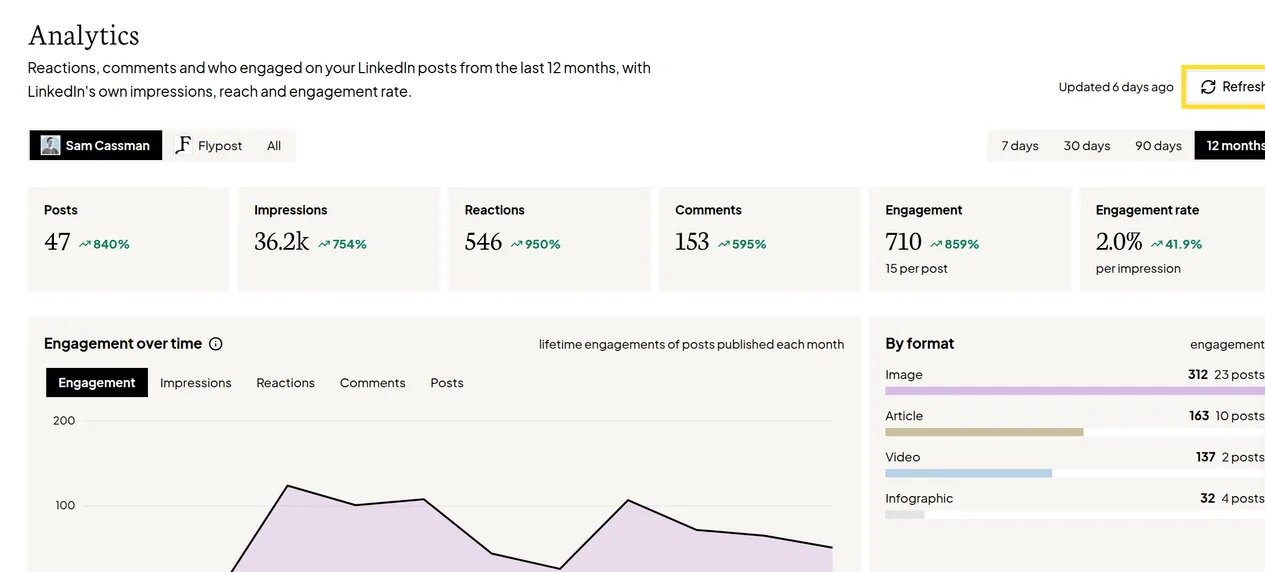
What does Analytics show?
At the top, choose a date range: 7 days, 30 days, 90 days or 12 months (the default). You'll see:
- Totals for Posts, Impressions, Reactions, Comments, Engagement and Engagement rate, each compared with the period before.
- A chart of how things changed over time, and a breakdown by format (text, image, carousel and so on), so you can see which kinds of post do best for you.
- A table of every post, which you can sort by date, impressions, reactions, comments or engagement. Click a post to see its reactions broken down and who engaged with it.
If the project has more than one LinkedIn account, a switch lets you look at one person, one company page, or All.
The Insights report shows the people who engaged with your posts, the most frequent ones, and how well they match the audience you described in your Business settings.
Which posts does Analytics include?
- Your own profile: every post from the last 12 months, whether you published it through Flypost or directly on LinkedIn. There's nothing to import: Flypost picks them up automatically.
- Teammates and company pages: only posts published through Flypost.
How often does Analytics update?
Automatically once a week, on Monday mornings. To get the latest numbers sooner, click Refresh at the top of the page. It takes 3 to 5 minutes, and the page shows when it was last updated.
Common questions
- Why is Analytics locked?
- Analytics is included on the Pro and Agency plans. If you're a teammate, it follows the plan of the person who owns the project. You can upgrade from Plans & billing in the project menu.
- Do posts I published directly on LinkedIn show up?
- Yes, for your own profile. Flypost picks up your last 12 months of posts whether you published them through Flypost or on LinkedIn. For teammates and company pages, only posts published through Flypost are tracked.
- Why are impressions missing on some older posts?
- LinkedIn's impression numbers come in batches, so older posts fill in over the next few refreshes. Until then they show a dash.
- How often do the numbers update?
- Automatically once a week, on Monday mornings. Click Refresh at any time to fetch the latest numbers, which takes 3 to 5 minutes.