
How do I use Flypost from ChatGPT or Claude?
Last updated 25 October 2026
Quick answer
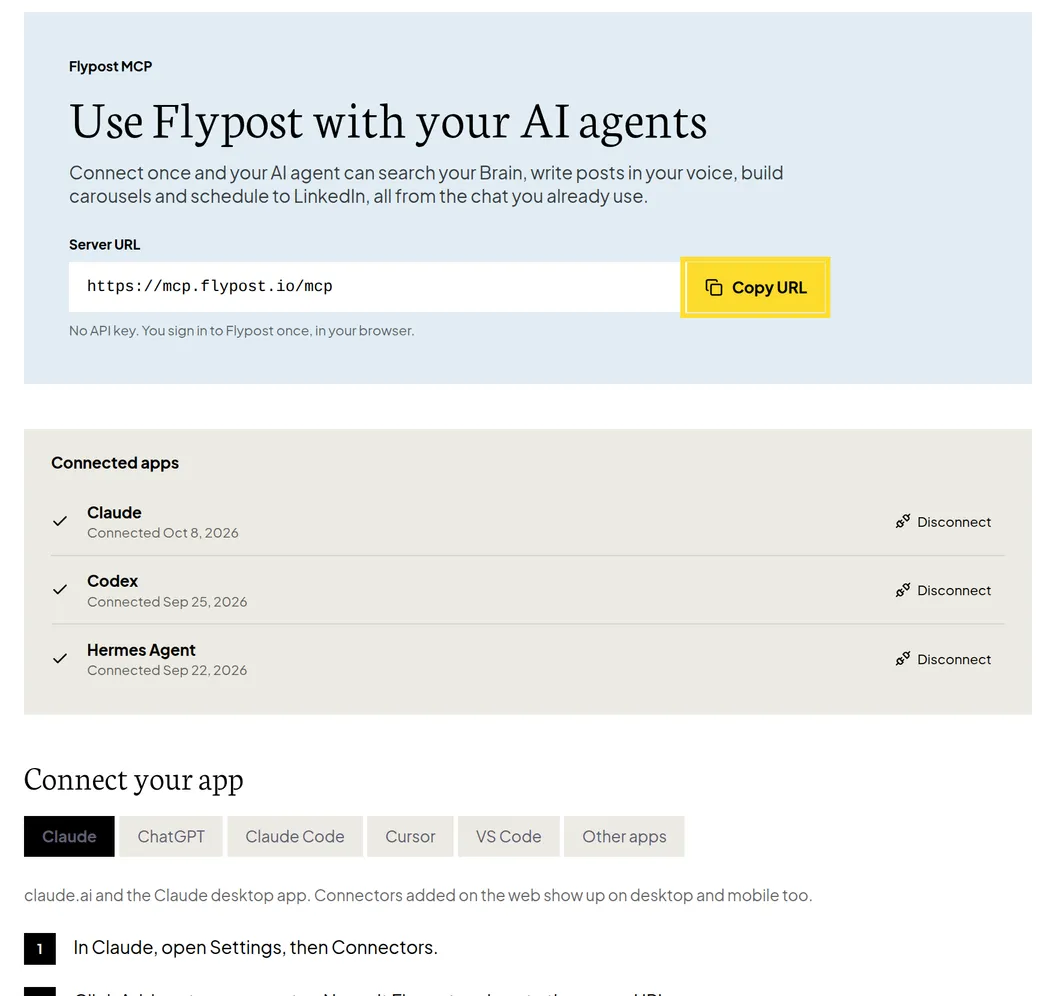
Open the project menu at the bottom of the sidebar and click Connect AI tools. Copy the server address (https://mcp.flypost.io/mcp), add it as a connector in your AI app, and sign in to Flypost when asked. There's no API key. Disconnect any app from the same page.
Do you spend half your day in ChatGPT or Claude already? You can bring Flypost with you. Once it's connected, your AI assistant can search your Brain, write posts in your voice, build ideas and schedule to LinkedIn, all from the chat you already use, without copying and pasting between tabs.
In this guide we'll cover how to connect Flypost to the most popular apps, what to do when the assistant picks the wrong project, and how to disconnect. Read on to find out more.
Where do I connect Flypost to an AI app?
Click the button with your project's name at the bottom of the sidebar, then Connect AI tools. The page shows the one address every app needs:
https://mcp.flypost.io/mcp
Click Copy URL, then follow the steps for your app on the same page. There are tabs for Claude, ChatGPT, Claude Code, Cursor, VS Code and Other apps.
How do I connect Flypost to Claude?
- In Claude, open Settings, then Connectors.
- Click Add custom connector, name it Flypost, and paste the server address.
- Claude opens a Flypost window. Sign in with your normal Flypost account and click to authorise.
How do I connect Flypost to ChatGPT?
- In ChatGPT, open Plugins, then Settings, then MCP, and click Add server.
- Paste the server address and choose Streamable HTTP. Leave any token fields empty.
- Sign in to Flypost in the window that opens and authorise it.
The connection lasts a year, after which the app asks you to sign in again.
What can my AI assistant do with Flypost?
Anything you'd ask a colleague who knows your Flypost workspace: "find what we've said about pricing in my Brain", "give me five post ideas about onboarding", "write a post about this article in my voice", or "schedule it for Tuesday morning". It works in whichever project it's using.
If it picks the wrong one, ask it to "list my Flypost projects", then tell it which one to use.
How do I disconnect an AI app?
On Connect AI tools, find the app under Connected apps and click Disconnect. You can also remove Flypost from the app's own connector or plugin settings.
Is there a Flypost command-line tool?
Yes, for developers. Install it with npm install -g flypost, then run flypost login and click
Authorize this device in the browser window that opens.
Common questions
- Do I need an API key to use Flypost in ChatGPT or Claude?
- No. You add Flypost's server address to your AI app and sign in to Flypost in your browser once. That's it.
- The assistant is using the wrong project. How do I change it?
- Ask it to list your Flypost projects, then tell it which one to use.
- How do I disconnect an AI app from Flypost?
- Go to Connect AI tools in the project menu and click Disconnect next to the app. You can also remove Flypost from the app's own connector settings.
- Can I change my plan from inside ChatGPT or Claude?
- No. Plans and billing are managed in the Flypost app, under Plans & billing.