
How do plans, billing and the free trial work?
Last updated 25 October 2026
Quick answer
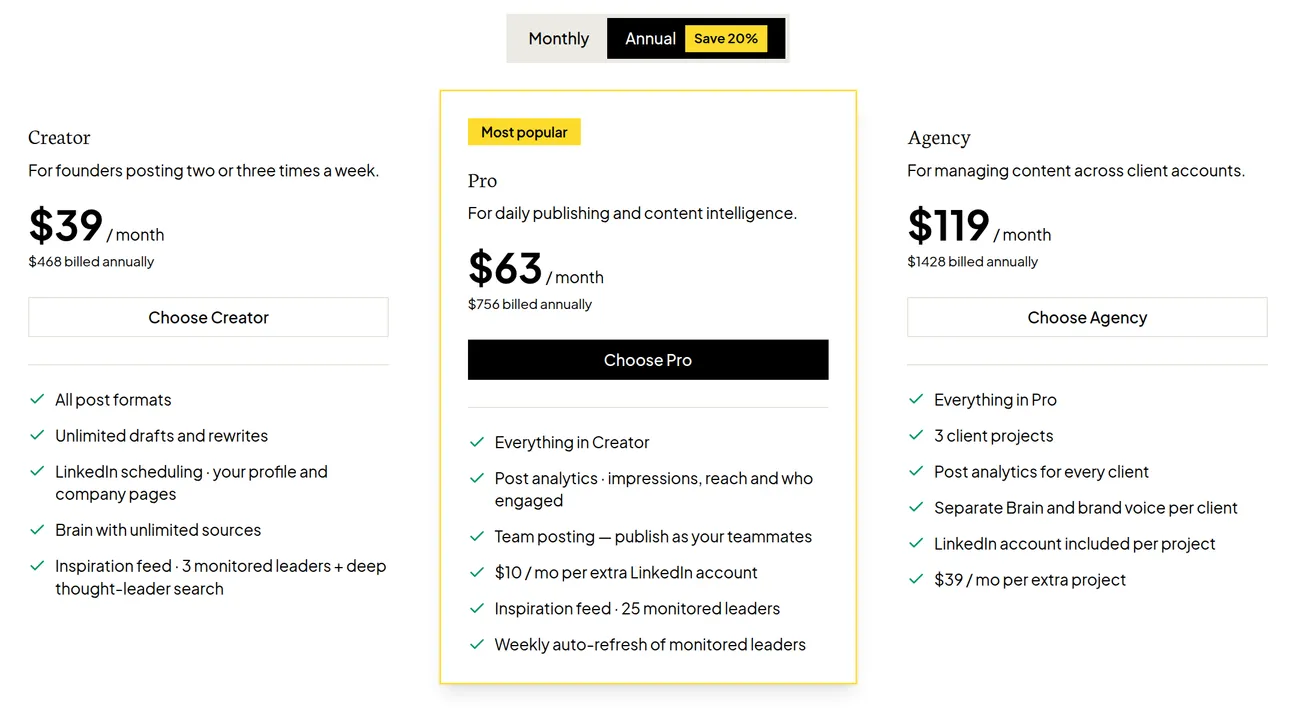
Flypost has three plans: Creator ($49 a month), Pro ($79) and Agency ($149), about 20% less when paid yearly. Every new customer can try any plan free for 7 days. Manage everything from Plans & billing in the project menu at the bottom of the sidebar, including invoices, your card and cancelling.
Are you trying to work out which Flypost plan is right for you, or how to change the one you're on? Everything to do with billing lives in one place, and changing plan never touches your content. This guide explains what each plan includes and walks through the things people most often need to do.
In this guide we'll cover the plans, the free trial, upgrading, invoices and card details, add-ons, and cancelling. Read on to find out more.
What does each Flypost plan include?
| Creator | Pro | Agency | |
|---|---|---|---|
| Monthly | $49 a month | $79 a month | $149 a month |
| Yearly | $468 a year | $756 a year | $1,428 a year |
| Every post format, unlimited drafts and rewrites | Yes | Yes | Yes |
| LinkedIn scheduling to your profile and company pages | Yes | Yes | Yes |
| Brain with unlimited sources | Yes | Yes | Yes |
| People you can monitor in Inspiration | 3 | 25 | 25 |
| Post analytics | No | Yes | Yes |
| Post as your teammates | No | Yes | Yes |
| Projects (brands) | 1 | 1 | 3 |
On Pro and Agency, each extra connected LinkedIn account is $10 a month (company pages are always free). On Agency, each extra project is $39 a month.
How does the free trial work?
Every new customer can try any plan free for 7 days. You add a card when you start, nothing is charged that day, and we email you a reminder about a day before the trial ends. If you cancel before then, you're never charged. If you don't, the plan starts automatically.
The trial is for first-time customers only. If you've had a Flypost subscription before, choosing a plan starts it straight away.
Where do I manage my plan?
Click the button with your project's name at the bottom of the sidebar, then Plans & billing.
How do I upgrade or change my plan?
On Plans & billing, click Upgrade to (or Switch to) on the plan you want. This opens our secure billing portal, run by Stripe, where you confirm the change. Your content, Brain and settings stay exactly as they are.
How do I update my card or download invoices?
Click Manage billing on the Plans & billing page. The billing portal that opens lets you update your card, see and download every invoice, and change your billing details.
If a payment fails, you'll see a banner in Flypost saying "Your last payment didn't go through", with an Update payment method button. Your access carries on for 7 days while you sort it out.
What add-ons are there?
- Extra LinkedIn accounts (Pro and Agency): $10 a month each, added when the account is connected. See connecting LinkedIn.
- Extra projects (Agency): $39 a month each. Use Talk to us when you hit the limit.
- Videos: every account gets 3 free videos. After that, Videos is $29 a month for 10 videos, or Videos Plus is $69 a month for 30. Add or cancel it from the Videos card on Plans & billing.
How do I cancel my subscription?
- Go to Plans & billing and click Cancel subscription (or Cancel trial).
- Tell us why you're leaving. It genuinely helps us, and you can skip the follow-up question.
- Confirm with Cancel subscription.
Depending on your plan, we may offer you a discount to stay before you confirm. You can take it or carry on cancelling.
After you cancel, you keep everything until the end of the period you've paid for, and a Keep my plan button lets you change your mind any time before then.
Common questions
- How much does Flypost cost?
- Creator is $49 a month, Pro $79 and Agency $149. Paying annually saves about 20%: $468, $756 and $1,428 a year.
- Will I be charged during the free trial?
- No. The trial is free for 7 days and we take a card at the start. We email you a reminder about a day before it ends. If you cancel before the trial ends, you're never charged.
- Where do I find my invoices?
- Go to Plans & billing in the project menu and click Manage billing. Your invoices and receipts are in the billing portal that opens.
- Do my teammates need their own plan?
- No. People you invite to a project use that project's plan, at no extra cost.
- Can I get a refund?
- Refunds are available within 7 days of a trial turning into a paid plan, or of a new or renewed annual payment. Contact support and we'll sort it out.
- What happens to my content if I cancel?
- You keep full access until the end of the period you've paid for. After that your workspace is locked, but your content stays in place, so you can pick up where you left off if you come back.