
How do I connect my LinkedIn account to Flypost?
Last updated 25 October 2026
Quick answer
Open the project menu at the bottom of the sidebar, choose Project settings, then the LinkedIn tab, and click Connect LinkedIn. Approve Flypost in the LinkedIn tab that opens, and you can schedule and publish straight from Flypost, to your profile and to any company page you admin.
Are you trying to get Flypost to post to LinkedIn for you? You only need to connect your account once, and it takes about a minute. The one thing that catches people out is that there are two LinkedIn sections in Flypost, and only one of them lets Flypost publish.
In this guide we'll cover where to connect LinkedIn, how company pages work, what to do when a connection expires, and how to disconnect. Read on to find out more.
Where do I connect LinkedIn in Flypost?
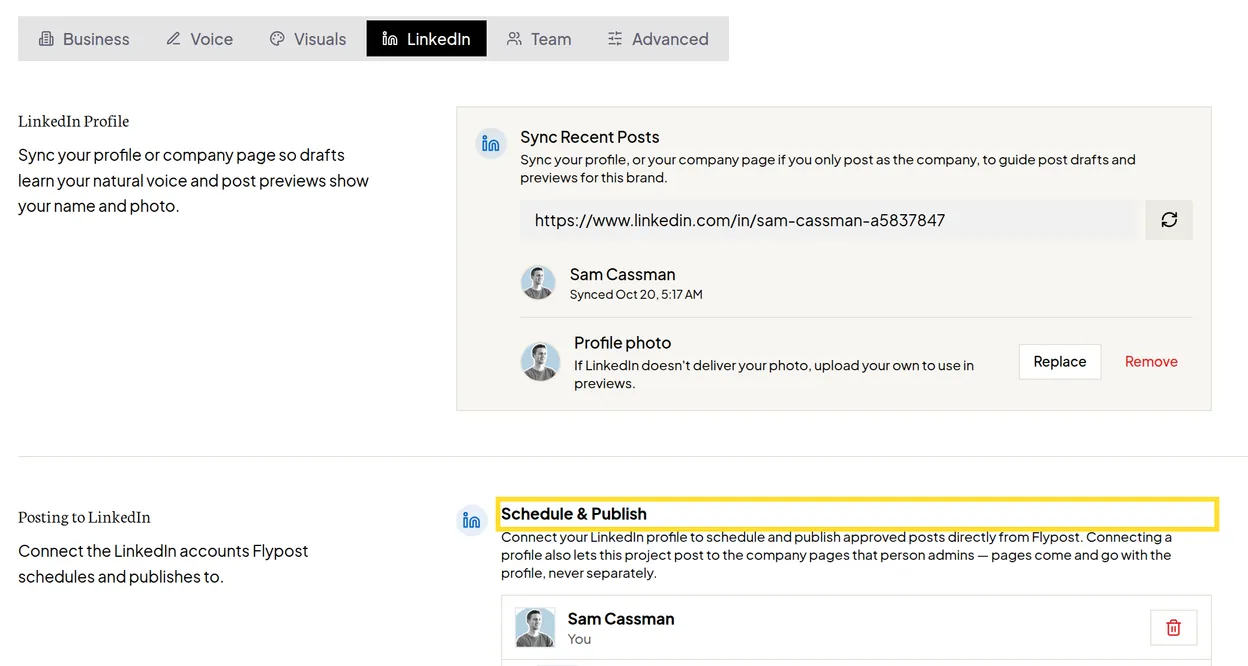
LinkedIn lives in your project settings.
- Click the button with your project's name at the bottom of the sidebar.
- Choose Project settings.
- Click the LinkedIn tab.
- Scroll to Posting to LinkedIn and click Connect LinkedIn.
What happens when I click Connect LinkedIn?
LinkedIn opens in a new browser tab and asks you to sign in (if you aren't already) and to allow Flypost to post on your behalf.
- Approve the request on LinkedIn.
- You'll see "Your LinkedIn account is connected". You can close that tab.
- Back in Flypost, a message confirms "LinkedIn connected for post scheduling", and your account appears in the list.
If your browser blocks pop-ups, LinkedIn opens in the same tab instead, and brings you back to Flypost when you're done.
If you skip this step, Flypost reminds you the first time you open a draft, with a small window called Publish straight from Flypost. Clicking Connect LinkedIn there does the same thing.
Can Flypost post to my company page?
Yes, as long as you're an admin of the page on LinkedIn. You don't connect company pages separately: they come with your personal profile. Once you're connected, each page you admin is listed under your name, marked Company page.
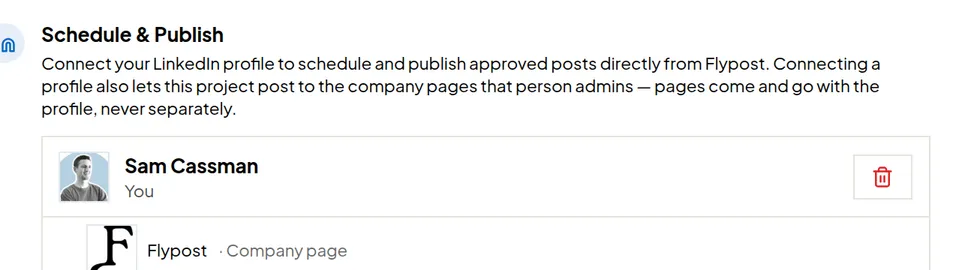
When you schedule a post, choose the page under Post as. There's a step-by-step guide in how to schedule and publish posts.
How many LinkedIn accounts can I connect?
Every plan includes one connected LinkedIn account per project, and company pages are always free.
- Creator plan: one personal account. Connecting a second one needs a Pro or Agency plan.
- Pro and Agency plans: you can connect more people (for example, teammates who want Flypost to post as them). Each extra account is $10 a month, and Flypost asks you to confirm before adding it.
The card shows how many accounts you're using, for example "1 of 1 connected accounts in use".
Why has my LinkedIn connection stopped working?
LinkedIn connections don't last forever. LinkedIn can expire or revoke them, for example when you change your LinkedIn password or remove Flypost from your LinkedIn settings. When that happens:
- the account disappears from the Schedule & Publish card, and
- anything scheduled through it is cancelled and goes back to being an unscheduled draft.
To fix it, click Connect LinkedIn again, then reschedule the posts that were cancelled. You can find them on the Posts page with the status filter set to Not scheduled.
How do I disconnect LinkedIn from Flypost?
- Go to Project settings, then the LinkedIn tab.
- Click the bin icon on the account's row.
- Read the warning, then click Disconnect account.
Disconnecting removes the account's company pages from the project too, and cancels anything still scheduled through it. You can only disconnect your own account, unless you're the project owner.
Common questions
- Can Flypost post to my LinkedIn company page?
- Yes. When you connect your personal profile, every company page you're an admin of comes with it. Pick the page under 'Post as' when you schedule a post. Company pages are free and don't count towards your connected accounts.
- Why did my LinkedIn account disappear from Flypost?
- LinkedIn connections expire or get revoked from time to time, for example after you change your LinkedIn password. When that happens the account drops off the list and anything scheduled through it is cancelled. Click Connect LinkedIn to connect it again, then reschedule those posts.
- Is 'Sync Recent Posts' the same as connecting LinkedIn?
- No. Sync Recent Posts only reads your public profile so drafts learn your voice and previews show your photo. Only the Connect LinkedIn button lets Flypost publish for you.
- Can I connect a colleague's LinkedIn?
- Each person connects their own. Invite your colleague to the project's team, and they connect their LinkedIn from the same LinkedIn tab when they sign in. Posting as other people needs a Pro or Agency plan.