

How to Write a LinkedIn Summary (+ Examples)

By Sam Cassman · Last verified
How do you write a LinkedIn summary? Your summary is now the About section on your profile, and visitors see only its first two or three lines before a "more" link. So open with who you help and what with, then use the rest of the 2,600 characters to explain the problem, show proof and say what to do next.
Are you looking for a way to write a LinkedIn summary that people actually read? It's a strange box to fill in. LinkedIn no longer calls it a summary, the advice out there ranges from "tell your story" to "cut your story", and many example lists are long CVs pasted into a text box. We wanted one guide that matches what the editor looks like today.
Most people think a good summary is a full, polished account of their career. When we looked at how the section actually displays on a real profile in October 2026, the job looked different: visitors see two or three lines and a "more" link, so those opening lines do almost all the work and the rest is there for the few who click.
In this article we'll cover where the summary lives now, how long it can be, a simple four-part shape, five examples you can adapt, and what three LinkedIn creators say about it. Read on to find out more.
Where is the summary on a LinkedIn profile?
It's the About section. LinkedIn used to label it "Summary", and plenty of people still search for it that way, but it is the same box, sitting below the card with your photo and headline. To change it, open your profile, find About and click the pencil at its top right. A dialog called Edit about opens.
Above the text box LinkedIn gives a short prompt: "You can write about your years of experience, industry, or skills. People also talk about their achievements or previous job experiences."
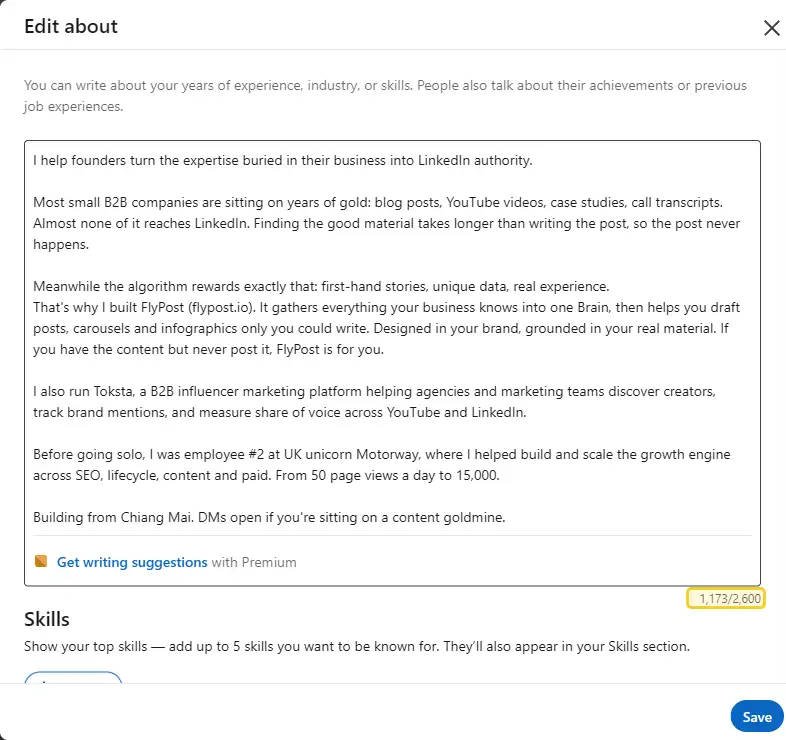
Under the box is a Skills block, where you can "add up to 5 skills you want to be known for". LinkedIn says those also appear in your Skills section, so they are worth choosing with care. Our guide to optimising the rest of your LinkedIn profile covers skills and the other sections in more detail.
Knowing where the box is, the next question is how much you can put in it.
How long can a LinkedIn summary be?
The About section takes up to 2,600 characters. The editor shows a live counter under the box, so you never have to count. You don't need to use it all: our founder's summary in the screenshot above uses 1,173.
The limit that changes how you write is not 2,600, though. It is the fold. On a profile, visitors see only the opening lines before a "… more" link, and many won't click it. Here is what a visitor saw of the same summary:

The cut is made by lines, not by a fixed number of characters, and blank lines use some of them up. So plan for the first two or three lines being all many people read. Our guide to every LinkedIn character limit puts the About section next to the headline, post and message limits if you want them in one place.
So what goes in those lines, and in the rest?
How do you write a LinkedIn summary, step by step?
Write it in four parts: who you help, their problem, your proof and the next step. That order puts the most useful sentence above the fold, gives the curious reader a reason to keep going, and ends by telling them what to do. It works whether you're a founder, a freelancer or looking for a job.
- Line one: who you help, and with what. One plain sentence. "I help early-stage SaaS teams fix their onboarding" beats "Passionate, results-driven professional".
- Line two: the problem, in their words. Describe what your reader is stuck on, the way they would say it to a friend. This is what makes the right person click "more".
- The middle: proof. A role, a result, a number you can stand behind. One or two specifics are worth more than a list of adjectives.
- The end: one next step. "Message me", "book a call through the link in Featured", "I'm looking for my next role in X". Pick one.
Our founder's own summary follows that shape. It opens with who it's for ("I help founders turn the expertise buried in their business into LinkedIn authority"), names the problem in line two, then gives the proof (employee number two at Motorway, helping it grow from 50 page views a day to 15,000) and ends with an invitation to get in touch.
Instead of
Experienced marketing professional with a passion for growth, innovation and building high-performing teams.
Try
I help B2B software companies turn their customer calls into content that sells.
Adjectives about yourself → who you help and what with · Illustrative example, written by us. Not a real post from the study.
A few things to leave out: a list of every job you've had (that is what Experience is for), buzzwords nobody can check, and an opening that is about you rather than your reader. Write in the first person ("I help..."), because it is your own profile and the third person reads like a press release.
The shape is easier to see in a finished summary, so here are five.
What are some good LinkedIn summary examples?
Below are five examples for different roles, each built on the four-part shape. They are illustrative, written by us for this guide, not copied from real profiles, so swap in your own facts and numbers. Never borrow a result you can't stand behind. The first two lines of each are the part that shows before "more".
LinkedIn summary example for a founder or consultant
I help finance teams at mid-sized manufacturers close their month in days, not weeks.
Most of them still run the close on spreadsheets emailed between five people, and every month the same numbers get checked three times.
For the last eight years I've worked on exactly that problem, first as a finance director and now running a small consultancy. We redesign the process, set up the software you already pay for and train your team to run it without us.
If your close takes more than a week, send me a message and I'll tell you where the time is going.
LinkedIn summary example for a freelancer
I design websites for independent restaurants that want more bookings, not just a nicer homepage.
Most restaurant sites hide the menu in a PDF and the booking button three clicks deep. Your guests are on their phones, standing outside, deciding.
I've built sites for cafés, bistros and a few places with waiting lists, and every project starts with your booking numbers, not your logo.
My portfolio is in Featured. If you'd like a quick review of your current site, message me.
LinkedIn summary example for a sales professional
I help IT leaders at UK schools choose classroom tech they'll still be happy with in five years.
Buying for a school means juggling tight budgets, long approval chains and kit that has to survive thirty teenagers a day.
I've spent six years on the supplier side, working with schools and trusts of every size. My job is to say no to the wrong product as often as yes to the right one.
If you're planning a refresh for next year, let's talk before you write the tender.
LinkedIn summary example for a job seeker or career changer
Operations manager moving into product management, looking for a junior PM role at a B2B software company.
For five years I've been the person who turns messy processes into ones a team actually follows. That turned out to be most of product work: finding the real problem, agreeing what to build, and making sure it ships.
Recently I led the rollout of a new booking system across four sites, working with the vendor's product team week by week, and finished a product management course alongside it.
I'm open to roles in London or remote. If you're hiring, or know someone who is, I'd love to hear from you.
LinkedIn summary example for a student or graduate
Final-year computer science student who builds small tools that save people time.
I'm looking for a graduate software engineering role starting next September, ideally in a team that ships every week.
My final-year project is a timetable app that a few hundred students at my university now use. Before that I spent a summer as an intern on a data team, cleaning up reports nobody trusted.
My projects are linked in Featured. I'm always happy to chat to engineers about their work.
Notice what they share: none of them opens with a job title alone, each makes clear who it is for, and each ends with a single, specific ask. If you'd rather not start from a blank box, our free generator will draft one for you.
Can LinkedIn write your summary for you?
Only if you pay, and only for some subscribers. Under the text box in Edit about there's a link reading "Get writing suggestions with Premium". LinkedIn's help page on Profile Writing Assistance, updated in November 2026, says the feature "is available only to a select group of LinkedIn Premium subscribers", and that you can edit its suggestion in the box before saving.
We didn't try it, so we can't tell you how good its drafts are. Whatever drafts your summary, an AI tool or a friend, read it as a stranger would. If a claim isn't true, or a sentence could be about anyone, rewrite it. Your summary is your words on your own profile, and the people reading it may end up meeting you.
What do LinkedIn experts say about writing your About section?
They agree on more than you might expect: write for one reader, keep it easy to skim and finish with a next step. These are three short quotes from public LinkedIn posts. They are the creators' opinions, not LinkedIn's rules.
Will McTighe, who writes about LinkedIn profiles, says the summary should be about the reader:
"Explain how your experience benefits the person reading. Keep it scannable with bullets and cut anything that reads like a résumé summary."
Nader Alnajjar puts the opening even more bluntly:
"About → Lead with their pains and how you solve them."
And Yonathan Levy covers the ending:
"Your headline should make it obvious what you do. Your about section should tell them exactly what to do next. Your featured section should have one clear link."
Where creators disagree is your story. Some say to tell it, as long as it's told in terms of how you help people. Others say an origin story with nothing in it for the reader is the first thing to delete. Both fit our shape: a story earns its place in the middle when it proves you understand the reader's problem, and not when it's only about you.
What should you check before you save your LinkedIn summary?
Read it once as a stranger, then run through this list. It takes two minutes and catches the mistakes that matter most, because they sit in the lines everyone sees.
- Do the first two lines work alone? Cover the rest. Can someone tell who you help and with what?
- Is it about the reader? Count the sentences that start with "I am" or "I have". Turn some into what that means for them.
- Is there one piece of proof? A role, a result or a number you could explain in an interview.
- Is there one next step? One ask, not three.
- Is it skimmable? Short paragraphs with a blank line between them, as in our examples.
- Does your opening earn the click? Our guide to writing LinkedIn hooks that make people read on is about posts, but the same rule holds here: the first words decide whether anyone clicks "more".
- Did you pick your five top skills? They're in the same dialog, under the text box.
Then click Save. You can come back and change it as often as you like.
How we checked this LinkedIn summary advice
This is a how-to page, not one of our data studies, so it makes no claims about what LinkedIn's algorithm rewards. On 12 October 2026, signed in to our founder's own account on a desktop browser, we opened the About section and the Edit about dialog, read the prompt, the counter and the Skills block, and captured both screenshots on this page. We closed the editor without saving.
On 26 November 2026 we read LinkedIn's help page on Profile Writing Assistance for the Premium writing suggestions. The 2,600-character limit is the one shown in the editor's own counter. The five examples were written by us for this guide and describe no real person. The creator quotes come from public LinkedIn posts saved in Flypost's Inspiration feed, quoted word for word and linked.
Frequently asked questions
- Where is the summary on LinkedIn now?
- It is the About section on your profile. LinkedIn renamed it, but it is the same box. To change it, open your profile, find About and click the pencil at its top right, which opens a dialog called Edit about.
- How long should a LinkedIn summary be?
- Up to 2,600 characters, and the Edit about box shows a live counter. Length matters less than the opening, because visitors see only the first two or three lines before a more link. Many good summaries sit well under the limit; ours uses about 1,200 characters.
- What should I write in my LinkedIn About section?
- Four things, in this order: who you help and with what, the problem they have, proof that you can solve it (a role, a result, a number you can stand behind), and one next step, such as sending you a message.
- Should a LinkedIn summary be written in the first person?
- Yes, for most people. The summary sits on your own profile, so writing it as I reads naturally, and LinkedIn's own prompt in the editor talks about your experience and achievements. Writing about yourself in the third person tends to read like a press release.
- Can LinkedIn write my summary for me?
- Only with Premium. The Edit about box shows a link for writing suggestions with Premium, and LinkedIn's help page, updated in November 2026, says its Profile Writing Assistance is available only to a select group of Premium subscribers. Free tools can draft one for you instead; always check the result is true before you save it.
Written by
Sam Cassman
Founder, Flypost · Chiang Mai, Thailand
I'm Sam. I built Flypost after watching too many good businesses sit on years of material (blog posts, call transcripts, case studies, half-finished decks) and post almost none of it.
I write everything here myself. When I claim something works on LinkedIn, it's because I tested it first-hand or ran the numbers across our own data. Where I'm working from a small sample, I'll say so. I'd rather be useful than certain.